DataRobot for Developers: Skills in Cursor, Gemini, and Claude
The hardest part of building against a new platform is teaching your tools about it. Your coding agent doesn’t know the SDK’s conventions. Your IDE doesn’t know the CLI commands. Your terminal doesn’t know the auth pattern. Every gap is a context switch, and every context switch is time spent away from the work. DataRobot Skills close those gaps inside the tools you already use. Our marketplace listings in Anthropic, Gemini and Cursor close them at the install step.
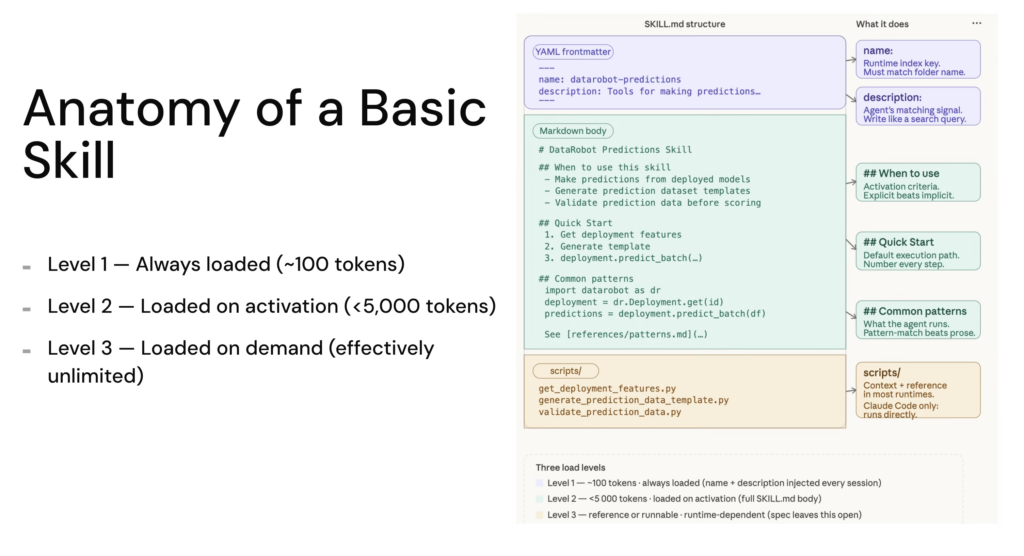
What are Skills?
A Skill is a folder with a SKILL.md file. The frontmatter tells the agent when the skill applies. The body tells it how to do the work. The agent loads only the skills relevant to the current task, so context stays clean and reasoning stays sharp.
DataRobot Skills are Agent Context Protocol definitions. They work across Claude Code, Cursor, Codex, Gemini CLI, Amp, VS Code Copilot, Goose, Letta, Kilo Code, and OpenCode. They are not slash commands and not MCP tools. They are the procedural knowledge your agent needs to use the SDK, the CLI, and the platform correctly, every time.
The point of the marketplace listings is to remove the install step entirely so developers find DataRobot at the moment they’re picking tools, not after they’ve already committed to a workflow.
Where DataRobot Skills are officially available
- https://github.com/datarobot-oss/datarobot-agent-skills
- https://geminicli.com/extensions/?name=datarobot-ossdatarobot-agent-skills
- https://cursor.com/marketplace/datarobot
- https://claude.com/plugins/datarobot-agent-skills
What’s in the DataRobot Skills?
The repo currently ships 10+ official Skills, with new Skills being added every week. Each one corresponds to a core part of the DataRobot agent building workflow.
| Skill | What it teaches the agent |
datarobot-setup | The on-ramp. Installs the DataRobot CLI, Python SDK and Agent Assist, configures the endpoint and API key, and verifies connectivity. Run this first and you don’t need to worry about a single thing around setup. |
datarobot-agent-assist | The full agent lifecycle. Generates agent_spec.md from a guided design conversation, rehearses tool calls before any code is written, scaffolds against the Agentic Starter template, runs local tests, and deploys to the DataRobot platform. |
datarobot-model-training | Project creation, AutoML configuration, target leakage checks, partitioning patterns. |
datarobot-predictions | Batch and real-time prediction generation, template scaffolding for prediction APIs. |
datarobot-model-deployment | Deploying and managing models, including governance settings and deployment metadata. |
datarobot-feature-engineering | Feature analysis, transformations, derived feature workflows. |
datarobot-model-monitoring | Performance and data drift monitoring, accuracy tracking, alert configuration. |
datarobot-model-explainability | Prediction explanations, feature impact, model diagnostics. |
datarobot-data-preparation | Dataset upload, validation, schema checks, and registry workflows. |
datarobot-app-framework-cicd | CI/CD pipelines for DataRobot application templates. |
datarobot-external-agent-monitoring | OpenTelemetry instrumentation for external agents reporting into DataRobot. |
Two of these change the experience the most. datarobot-setup is the on-ramp: before it existed, a developer who installed the Skills still had to manually authenticate, point the SDK at the right base URL, and confirm everything was wired up. Now the setup phase becomes another thing the agent does, not another thing the developer does.
datarobot-agent-assist brings the spec-driven design loop into the same context. Instead of switching to a different tool to design an agent, the developer asks for help, the skill activates, and dr assist runs from inside the same IDE conversation, producing an agent_spec.md and rehearsing the tool calls before any code is written. Design, test and deploy, all inside the agent loop.
How to install DataRobot Skills
Cursor
Open the Cursor marketplace entry for DataRobot, click the “Add to Cursor” button, and Cursor handles the rest. The Skills register against the workspace and become available in any chat. If you’d rather pin to the repo and version-control the install, open the repo as your workspace and Cursor reads AGENTS.md automatically.
Gemini CLI
Gemini CLI now treats DataRobot as an extension with bundled Skills. From your terminal:
gemini extensions install https://github.com/datarobot-oss/datarobot-agent-skillsThe Skills land in ~/.gemini/extensions/datarobot-agent-skills/skills and load on session start. Use /skills list inside a Gemini session to confirm. Environment variables propagate automatically.
Claude Plugins
For Claude users, DataRobot Skills are available through the plugin marketplace listing and you can run this command:
claude plugin install datarobot-agent-skills@claude-plugins-officialUniversal Instructions
The universal installer is the answer if you are running an AI IDE or CLI not listed above:
npx ai-agent-skills install datarobot-oss/datarobot-agent-skillsComing soon
The marketplace listings are the first step in distributing DataRobot’s developer surface the same way modern infrastructure tools distribute theirs. Expect the catalog to grow: more skills around the agent lifecycle, more bundled flows for Agent Assist, deeper coverage of governance and observability patterns that today live in docs rather than in agent context.
If you want to see what’s there now or contribute a pattern your team uses, the source of truth is the repo: github.com/datarobot-oss/datarobot-agent-skills. The marketplace listings track it.
The developer experience DataRobot is building is one where the platform shows up in the surface you already chose, with the on-ramp baked in. Skills are how that promise reaches the agent in your IDE. The marketplaces are how it reaches you.
Get started
- DataRobot’s Official GitHub: datarobot-oss/datarobot-agent-skills
- Claude: https://claude.com/plugins/datarobot-agent-skills
- Cursor: cursor.com/marketplace/datarobot
- Gemini: https://geminicli.com/extensions/?name=datarobot-ossdatarobot-agent-skills
- Part one of this series: DataRobot for Developers: Skills, MCP, and the agentic developer surface
- Join the conversation in the DataRobot Slack community
Get Started Today.