How to design and run an agent in rehearsal – before building it
Most AI agents fail because of a gap between design intent and production reality. Developers often spend days building only to find that escalation logic or tool calls fail in the wild, forcing a total restart. DataRobot Agent Assist closes this gap. It is a natural language CLI tool that lets you design, simulate, and validate your agent’s behavior in “rehearsal mode” before you write any implementation code. This blog will show you how to execute the full agent lifecycle from logic design to deployment within a single terminal session, saving you extra steps, rework, and time.
How to quickly develop and ship an agent from a CLI
DataRobot’s Agent Assist is a CLI tool built for designing, building, simulating, and shipping production AI agents. You run it from your terminal, describe in natural language what you want to build, and it guides the full journey from idea to deployed agent, without switching contexts, tools, or environments.
It works standalone and integrates with the DataRobot Agent Workforce Platform for deployment, governance, and monitoring. Whether you’re a solo developer prototyping a new agent or an enterprise team shipping to production, the workflow is the same: design, simulate, build, deploy.
Users are going from idea to a running agent quickly, reducing the scaffolding and setup time from days to minutes.
Why not just use a general-purpose coding agent?
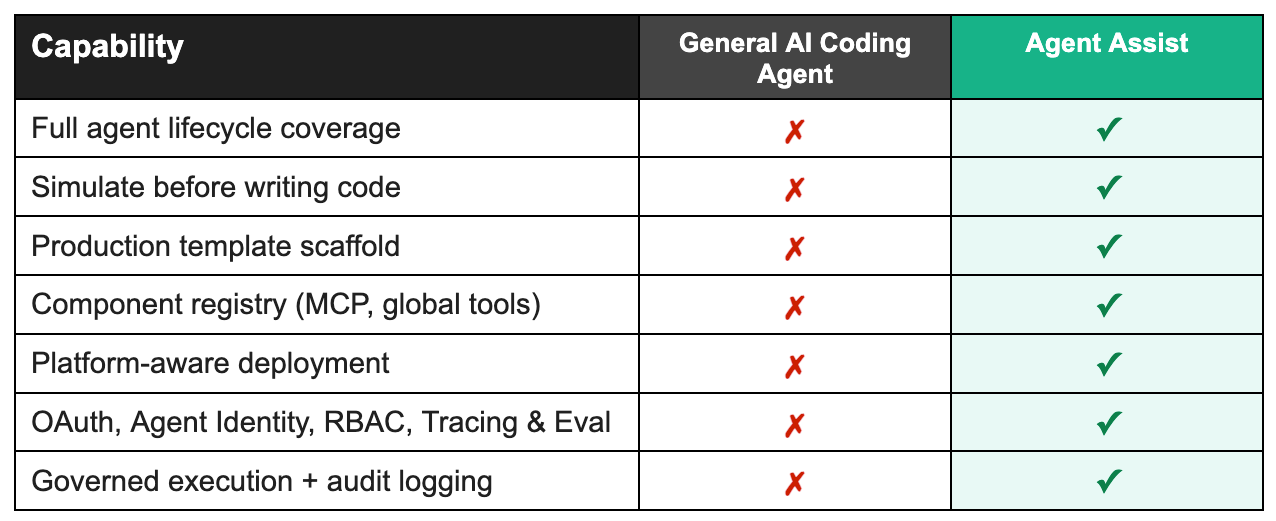
General AI coding agents are built for breadth. That breadth is their strength, but it is exactly why they fall short for production AI agents.
Agent Assist was built for one thing: AI agents. That focus shapes every part of the tool. The design conversation, the spec format, the rehearsal system, the scaffolding, and the deployment are all purpose-built for how agents actually work. It understands tool definitions natively. It knows what a production-grade agent needs structurally before you tell it. It can simulate behavior because it was designed to think about agents end to end.
The agent building journey: from conversation to production
Step 1: Start designing your agent with a conversation
You open your terminal and run dr assist. No project setup, no config files, no templates to fill out. You’ll immediately get a prompt asking what you want to build.
Agent Assist asks follow-up questions, not only technical ones, but business ones too. What systems does it need access to? What does a good escalation look like versus an unnecessary one? How should it handle a frustrated customer differently from someone with a simple question?
Guided questions and prompts will help with building a complete picture of the logic, not just collecting a list of requirements. You can keep refining your ideas for the agent’s logic and behavior in the same conversation. Add a capability, change the escalation rules, adjust the tone. The context carries forward and everything updates automatically.
For developers who want fine-grained control, Agent Assist also provides configuration options for model selection, tool definitions, authentication setup, and integration configuration, all generated directly from the design conversation.
When the picture is complete, Agent Assist generates a full specification: system prompt, model selection, tool definitions, authentication setup, and integration configuration. Something a developer can build from and a business stakeholder can actually review before any code exists. From there, that spec becomes the input to the next step: running your agent in rehearsal mode, before a single line of implementation code is written.
Step 2: Watch your agent run before you build it
This is where Agent Assist does something no other tool does.
Before writing any implementation, it runs your agent in rehearsal mode. You describe a scenario and it executes tool calls against your actual requirements, showing you exactly how the agent would behave. You see every tool that fires, every API call that gets made, every decision the agent takes.
If the escalation logic is wrong, you catch it here. If a tool returns data in an unexpected format, you see it now instead of in production. You fix it in the conversation and run it again.
You validate the logic, the integrations, and the business rules all at once, and only move to code when the behavior is exactly what you want.
Step 3: The code that comes out is already production-ready
When you move to code generation, Agent Assist does not hand you a starting point. It hands you a foundation.
The agent you designed and simulated comes scaffolded with everything it needs to run in production, including OAuth authentication (no shared API keys), modular MCP server components, deployment configuration, monitoring, and testing frameworks. Out of the box, Agent Assist handles infrastructure that normally takes days to piece together.
The code is clean, documented, and follows standard patterns. You can take it and continue building in your preferred environment. But from the very first file, it is something you could show to a security team or hand off to ops without a disclaimer.
Step 4: Deploy from the same terminal you built in
When you are ready to ship, you stay in the same workflow. Agent Assist knows your environment, the models available to you, and what a valid deployment requires. It validates the configuration before touching anything.
One command. Any environment: on-prem, edge, cloud, or hybrid. Validated against your target environment’s security and model constraints. The same agent that helped you design and simulate also knows how to ship it.
What teams are saying about Agent Assist
“The hardest part of AI agent development is requirement definition, specifically bridging the gap between technical teams and domain experts. Agent Assist solves this interactively. A domain user can input a rough idea, and the tool actively guides them to flesh out the missing details. Because domain experts can immediately test and validate the outputs themselves, Agent Assist dramatically shortens the time from requirement scoping to actual agent implementation.”
The road ahead for Agent Assist
AI agents are becoming core business infrastructure, not experiments, and the tooling around them needs to catch up. The next phase of Agent Assist goes deeper on the parts that matter most once agents are running in production: richer tracing and evaluation so you can understand what your agent is actually doing, local experimentation so you can test changes without touching a live environment, and tighter integration with the broader ecosystem of tools your agents work with. The goal stays the same: less time debugging, more time shipping.
The hard part was never writing the code. It was everything around it: knowing what to build, validating it before it touched production, and trusting that what shipped would keep working. Agent Assist is built around that reality, and that is the direction it will keep moving in.
Get started with Agent Assist in 3 steps
Ready to ship your first production agent? Here’s all you need:
1. Install the toolchain:
brew install datarobot-oss/taps/dr-cli uv pulumi/tap/pulumi go-task node git python
2. Install Agent Assist:
dr plugin install assist
3. Launch:
dr assist
Full documentation, examples, and advanced configuration are in the Agent Assist documentation.
Get Started Today.